Ahh yes you are right. Any recommendations for a rig mic to hook up to one of the cameras?
I use RODE VideoMicro II on my tournament rig and I’ve seen other streamers using those as well. If you just want one, it’s plug and play. If you want two, you can send one through the L channel and one through the R channel and make both mono in OBS for individual mic control, for that you need this RODE splitter cable.
1 Like
Just make sure you have line of sight so put the RX high so other stuff doesn’t get in the way.
1 Like
Perfect. Any good recommendations on power banks and how many for the rig to run the cameras, multiviewer and transmitter?
Seems like the Yolobox Ultra now allows customized layout as well in their 2.5.0 update: https://youtu.be/-LTCrtHr4qA?si=7p9YP-3T9NFF746_&t=175
I wonder if those customized layouts are also available with the Yolobox Pro as well. It starting to look like quite a good option for a simplified setup.
I know a few using the Ultra currently for their streaming rigs and setups. I don’t think the Pro ever got all the same features (some were just silly missing things like the ability to rotate a source). I’ve been very happy with the Director Mini but I’d take a hard look at the Ultra today if I was buying new given the additional HDMI inputs.
I asked the company about the pro and the custom layout, here’s what they responded “Thank you for your appreciation! We’re sorry to inform you that due to CPU limitations, the Pro model does not support the custom multi-view feature.”
It seems like the only issue is the output resolution, it only supports 4K 30fps. I was hoping to capture a 4K 60fps output using my Atomos Ninja V to upload afterward. For streaming only it may do the job.
Sadly, no. These are the banks I use for various things but they’re starting to pop one after another.
- Amazon.com: HenHot 100W Power Bank, 30000mAh Laptop Portable Charger USB-C PD Fast Charging Laptop External Battery Pack for Dell,MacBook,HP,Asus,Lenovo,Steam Deck,Switch,iPhone,Galaxy, iPad and More : Cell Phones & Accessories
- Amazon.com: AMEGAT 140W Portable Charger, 27600mAh USB C 3-Port Laptop Power Bank PD 3.1 Fast Charging Digital Display Battery Pack for iPhone 16/15/14/13/12 Series, Samsung, MacBook, Dell, and More : Cell Phones & Accessories
Always get spares whatever brand you’re getting and ensure they support USB-PD 12v 3A for the multiviewer (I think 12v 1.5A is sufficient).
I’ve never had an issue with ROMOSS. They have a 30k and 60k power bank. I don’t use multi viewers though.
2 Likes
I’ve eyed these up but they’re not stackable without covering a vital component of the bank. That’s just my preference though.
There’s some shit reviews on on some of the models on AMZN too, YMMV.
They do support USB-PD 12v 3A.
1 Like
Been using those for my film rigs: Two 190Wh V-Mount Batteries & D-Tap Charger Bundle
I have V mount adapters which support USB and multiple voltages. I use that to power up my dummy camera batteries, mics, lights and everything. They last forever, they have multiple other sizes as well as power stations on their store.
I use those V-mount plates Advanced V-Mount Battery Mount Plate with Dual 15mm Rod Clamp
Most of SmallRig stuff is great and they sponsored me in the past too, great company 
looks great! Where did you find those plates for the 45 degree support?
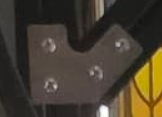
I checked on several websites selling extruded aluminum and couldnt find any.
Reviews look solid on the 30k and 60k versions and there are tons of reviews. I’ve had the 30k ones for over 4 years and still going strong. 60k versions have only been with me for like 2 years. But no issues yet.
Hey Everyone,
I’m on the lookout for a DMD Extender to borrow or purchase in the upcoming 2025 NW Pinball Championships.
If you have one (and are willing to part with it) please send me a PM and let me know!
Thank you!
Sorry about the late reply - I’ve been away for a bit. YpsiPinball used to use these. Their customer service is excellent. They give a crisp video feed in a space like yours with a clear LOS. They’re don’t have the long range or deal with interference like some of the more expensive options, but for a lot of people they’re great - and cheap. You can have up to 16 sets of these, if you wanted,.
We use 6 of these batteries for rig power - one on each Accsoon, and one on each camera, with the light panel plugged into one of the camera batteries. We’ve tried a lot of different batteries over the years and love these - they will run our rig for over 12 hours, recharge overnight, and the 22.5 watts is great for power hogs like the Accsoons.
FWIW, another nice thing about the Timbootechs is that they don’t use much power - you can easily run them from a 5W battery if you want.
1 Like
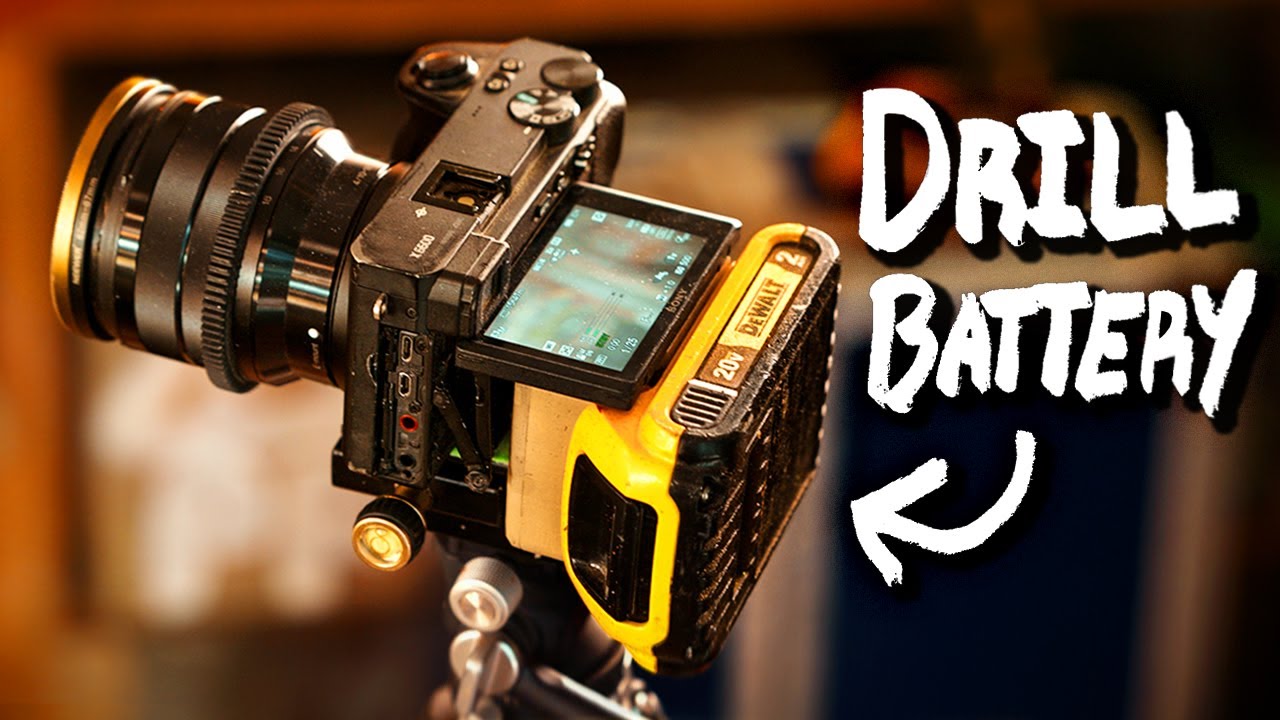
here could be another way to power rigs
1 Like
The first person who comes up with a tool “battery rail” that snaps to an 8020 that provide redundant USB-PD and USB 5V will make a lot of money.
2 Likes
Man that is a rad hack
Streaming setup
Hey Everyone- I’ve been trying to put all the equipment together to start a stream and I’m just looking for some advice. I’ve got some equipment already that I use for YouTube videos but I’m in need of capture card/stream deck.
Here’s the list of the equipment I already have available to me-
-(qty 2) Sony Fx30 with various lenses
-(qty 1) Sony ZV-1 MK2
-Rodecaster Pro with Rode XLR mics
-MacBook Pro with Apple M2
-Lenovo ThinkPad T15p Gen 2 Intel
-80/20 frame
-Wired Ethernet (will not be wireless streaming)
-various amaran lights
I’m planning on using OBS to stream. My dilemma is picking the right equipment for the capture card/stream deck. I’ve looked at the Yolobox Extreme but unsure if it can stream vertically for the playfield camera with the horizontal player camera at the same time. I was originally going to use an external GPU with a Magwell quad capture card but the Apple M2 won’t support external GPU anymore as I understand it- I could use the Lenovo but I would prefer the Mac because its what I use for video editing (plus the Lenovo is my wife’s). I don’t have any budget in mind, I just want to get the best looking/sounding stream that I can. I’m not very computer savvy - trying to put the work in to learn. Any suggestions on how to proceed would be greatly appreciated. Also- is there anything I’m missing off this list of equipment?
Thanks Everyone! - Drew
You may want to look into the 4k60fps multiviewer (Amazon.com: OREI 4K Multi HDMI Viewer Quad 4 in 1 Out, Switcher 4 Ports Seamless IR Remote Support 4K @ 60Hz 1080P for PS4/PC/DVD/Security Camera, HDMI Switch Optical Audio L/R Output - UHD-401MV : Electronics). It combines all your 1080 60 fps stream into one larger 4k60 fps. Then you only require a single capture card, ie: avermedia ultra gamer 2.1 which supports 4k60 fps (linux/mac/pc compatible). Keeps all your inputs synced as well that way, you can output your mixer to one of the camera and select that audio channel with the multiviewer so no audio sync issues. Then you can bring the same input multiple times in OBS and crop/rotate them to build your layout. It’s a clever way to do it and a lot more efficient imo. If you decide to go wireless at some point, you only have to add a wireless adapter to a single HDMI feed.
Only the Yolobox extreme supports 4k60 fps broadcast and output. I talked to Retroralph (thats what he’s using) https://www.youtube.com/watch?v=QHa2wDL1Ojo&t=4s and I also reached out to the company. It’s great and also supports custom layouts as well. Cant do as much as OBS but it simplifies the setup by a lot depending how deep you want to get. *Ralph had an issue on that stream he forgot to change the fps settings on his playfield camera, it was still at 24fps instead of bumping it to 60fps.
With an M2, I dont think you can run a 4K canvas in OBS since its too resource intensive. You will need to broadcast at 1080P 60fps.
Michael’s aka DRI374 website and videos helped me a lot GEAR FOR PINBALL AND ARCADE STREAMING - DRI374 LIVE PINBALL STREAMING Im still finalizing mine and waiting for a few things to arrive.