Hey Pat- wow! thank you so much for taking the time to respond- I greatly appreciate the suggestions and I will absolutely look into what you have suggested! Best of luck with your stream and I look forward to tuning in once you’re up and broadcasting- Cheers!
I think I read somewhere that these overheat or have some other kind of longevity issue? Maybe I mixed up model numbers.
I’m not sure if you’re mixing things up here a bit. You can 100% run a Magewell capture card externally on Mac using an external Thunderbolt case, like the SonnetTech.
You can NOT use an external GPU for video encoding, that has gone away for Apple Silicon.
Apple has its own Apple VT (Video Toolbox) library that integrates directly with Apple Silicon and provide H264, HEVC and ProRes encoding/decoding. It does a decent job, it will never come close to the efficiency of using an external GPU with Nvidia’s nvenc library on Windows or Linux. You can of course use x264 directly on the CPU, which looks fantastic, but it’s very taxing.
As @PsychoPat points out. Using a 4Kp60 canvas in OBS is challenging on Apple Silicon. I have an Apple M3 Max as my daily driver and while I can use a 4Kp60 canvas it will be the only thing I’ll be able to do. No external projectors or displays whatsoever as the Apple chip will be overloaded and your encoding will suffer (compression artifacts with bitrate fluctuating and frame stuttering). Forget using lanczos scalers or complex scenes and filters in OBS, you won’t be able to afford those on a 4K canvas.
Since you’re making videos for YouTube, I’m assuming you’re recording first and editing afterwards? I’m using the multiviewer mentioned above and I record the multiviewer output on an external recorder, that’s how I create 4Kp60 content for YouTube, while I stream 1080p60 to Twitch.
Hey dri- thanks for the write up here! I WAS mixing things up as far as capture cards/video encoders and this helps clear things up (like I mentioned-i’m not very tech savvy but wanting to learn). If I’m understanding you correctly all the encoding will be handled by my Laptop via the Apple VT and my laptop’s graphics card while the interfacing between my laptop and my cameras will be handled via capture cards. I’m going to read up on this equipment that you and Pat listed here. Thanks for taking the time to help me out! You probably won’t remember but we met at Chicago Expo last year- it was cool to see you moving around the show with your mobile rig! Hopefully we’ll see you back this year- thanks again!
I’m happy to help out. I met a lot of people at Expo last year.  I missed the boat for hotel rooms this year but I have a few other avenues to explore so we’ll see, I might be able to show up.
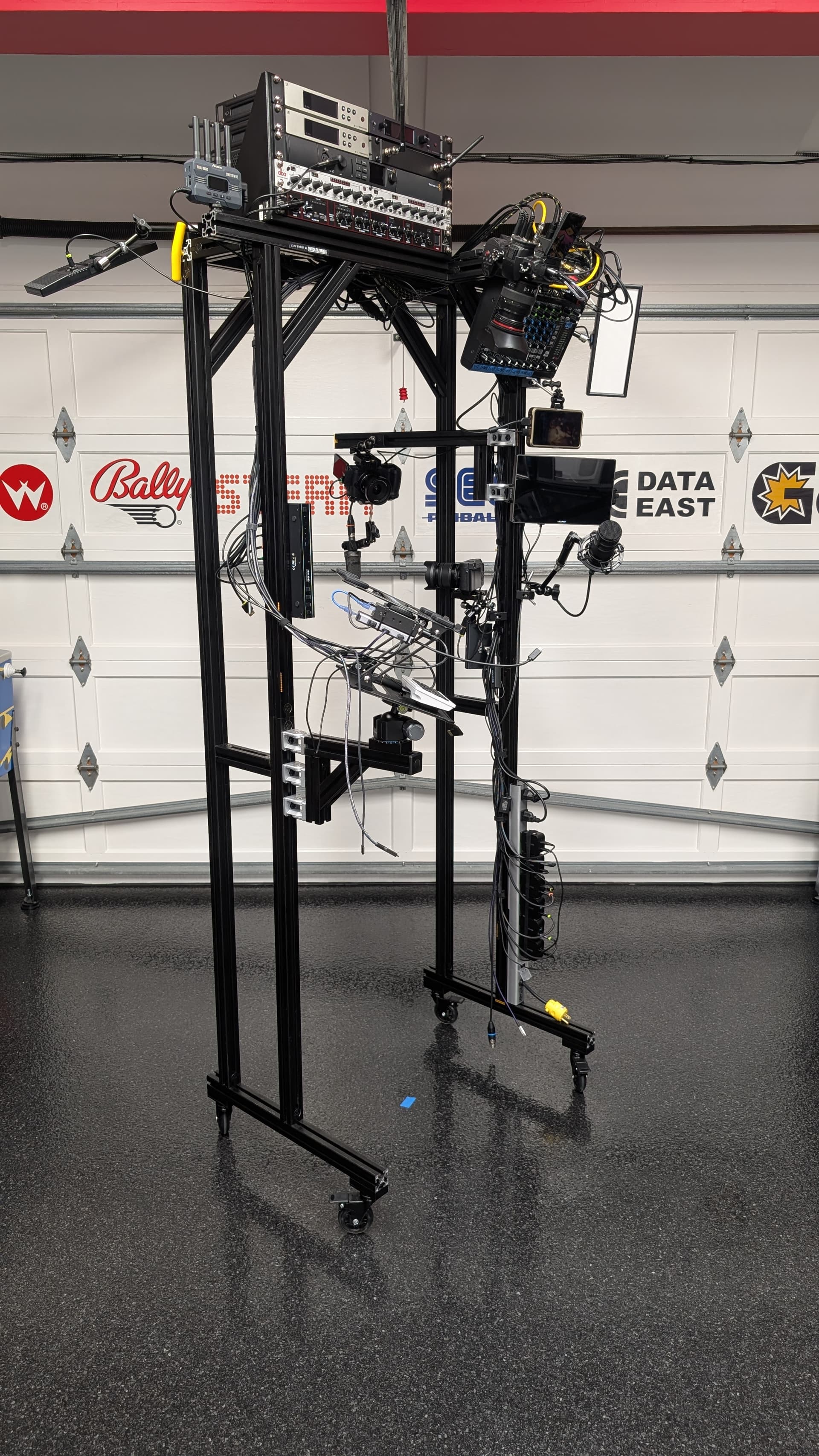
If you are a little bit like me and just keep clamping on stuff to your rig, this is a good hack to stop the frame from flexing once it gets a bit lumpy. The addition is offset by 7", the smallest ball head allen key I could find to fit in between.
The better solution is of course to build with 1530 from the start but I didn’t want to go down that path (yet).
2 Likes
Wow! Time to put some sturdier wheels haha
I looked at changing up the casters but they have a 400lbs rolling capacity and 500lbs static load. The rig does not weigh as much as an Avatar CE, there’s simply no way.
Although I do want to weigh the monstrosity to be fair.
1 Like
I always worry about what some of the products claim, they often tend to put higher capacity to what they can actually hold. When I was reading some of the reviews when looking at different wheels, you see some reviews that were not even at max capacity or half capacity and either the stem bent or wheel crushed. I figure they should be able to hold at least half of what they claim. The problem is when storing the rig over a machine in a row, if one of the wheel snap the damage would catastrophic for the rig equipment and for the machines under & around them. Im pretty sure mine is around 150-200 lbs without any rack of equipment on top. Godspeed!
Hear, hear! I’d hate to trap up mid-stream to deal with that.
Ok, for the record. Each side of the rig applies around 57lbs of pressure on a bathroom scale. Divide that to each wheel, around 28.5lbs, each wheel is rated 100lbs moving. If those wheels can’t hold 1/3 of the rated spec, I think we would have seen a “don’t try this at home post”.
1 Like
yeah I added up all the component manufacturer spec weight for almost everything on mine and included both of my package weight from the 8020 place. Comes to around 120 lbs including a few extra lbs for random bits, power bricks, adapters etc. So /4 around 30 lbs on each wheel, other than the mixer I don’t have any rack based component on top yet. Also I just have the spraynard frame version but I added a few more plates to make it stiffer. If it ends up under 150 lbs when everything is final that’s not too bad actually. It felt heavier than that when moving it around 
This is my struggle. It does not FEEL heavy at all. Before the extra framing I added it was only flexing a bit more than I was comfortable with. The “spraynard” rig does look like it weighs 300lbs and I totally get the worry there.
Anyhow, I found another bathroom scale and what you’re seeing in the picture weighs 126.3lbs total across two scales. This is not counting my MBP which is attached while streaming.
Are there any US sources for LVDS->HDMI boards? Seems the tariff situation is making them impossible to get (along with the better HOV boards too). I’m thinking about setting all of the games at our arcade with direct audio and video so when we roll the mobile rig up we can just reach to the side of the backbox and plug two wires in and have a better quality stream.
Unfortunately the Chinese ones are quite bad / not reliable and even the more expensive “geekworm” ones also have issues.
The only reliable option as far as I know are the HOV pinball ones that are coming from Australia, they retain the video on the original display while outputting an extra feed through DVI/HDMI.
I think I’ve bought 6 geekworm boards. Two worked reliably, so you need to buy 3 boards per game to see which works reliably.
This makes the rig immobile. -“Always remember to unplug the game before moving the rig.” One person will remember that, person number two won’t even know it’s connected.
I don’t see the value in having line-out audio on a mobile rig unless it’s static during a stream, i.e not used for a tournament. Having a dedicated mic for the backbox at the right level sounds great.
As for direct capture of the LCD I kind of get it, it looks very nice. If I owned an arcade I would use the HOV board and a ZowieBox and make the games LCD displays available over NDI on a network. That would not only allow you to grab the feed into your stream but also use on other displays around the arcade quite easily.
The audio piece might indeed be overkill but I do like the idea of direct video feeds. You’re right about it not being mobile but usually it’s me moving the rig. That being said NDI feeds is a clever idea and I’ve not played with a Zowiebox yet, my only worry on that front is whether the network can support a bunch of NDI feeds broadcasting locally. Is that a concern or does it not really matter if only one of them is being received at any given time?
NDI can be run in multicast that can truly bog down your network but that’s not how you would run it, you would run it in unicast, TCP or UDP. Only the client consuming a particular feed will eat off your bandwidth. It can be setup in OBS so you can have 100 games but only the NDI scene source being active is actually connected.
1 Like
Sorry to bump an older thread with a probably dumb question, but I’m trying to capture the LCD footage from my JAWS.
The Elgato capture card is having issues with the resolution that the LVDS-to-HDMI converter is putting out.
I order the converter following the old buffalo pinball post and have had it for a while.
It works to hook an HDMI monitor up to, but the Elgato software gives an error message about the resolution.
Is there anything I can change or adjust?
The capture card is an Elgato HD60, I picked it up after trying a newer Elgato that a friend had that would not display anything (so the error message of this one is actually an improvement)
Thanks,
-Charles
There’s a jumper on the GeekWorm board that you need to move. Is it in the correct position?
I believe the Elgato HD60 has proprietary drivers and a little app you can tweak the input signal. Have you flicked around there?
The “Elgato Software” might force 1080p60 on the input and that won’t work. Have you tried add the video source to a scene in OBS or any other video capture capable program that can auto-detect input?
Thanks for the reply, I’ll double check the jumper, what does the jumper do? I am getting HDMI output to a TV.
I checked every setting in the Elgato HD Capture program, and nothing made a difference.