You have 2 HDMI and 2 USB inputs and full control to layer and arrange them, rotate, size, crop, etc. Overlays right now are images, video, hoping they’ll add web overlays but that’s not in there yet. You can have multiple scenes to switch between and it streams out to YT, Twitch, RTMP, NDI, SRT. Also has a web interface, phone app, and full API. I’ve been experimenting with it since December and it has a lot of promise in a small device.
1 Like
The BOM that Phil originally posted from 8020 - did any of the beams need any specialized machining services? Where there any written out assembly instructions posted (it’s a rather long threat to try and look through)?
When Karl switched out the 1515’s for 1530’s, did anything need to be changed in terms of the BOM as Phil had posted it other than just switching out the beam type?
Thanks for any clarification you can provide.
Patrick
My design does not require any counterbores. Karl’s does. Both designs function fine but Karl’s looks a lot cleaner because the butt joint connections are hidden. The only advantage of mine is that it may take less time to ship. Might be a little cheaper? I’m not sure. If I were ordering a new rig now I would go with Karl’s version.
No you cannot simply swap in 1530 for my design.
Someone posted an assembly video earlier in the thread. But honestly it’s not that hard to intuit how it goes together.
Is there a bill of materials and instructions posted for Karl’s design? I didn’t see one scanning through the thread. Thanks!
Yes he posted one in this thread
Perhaps of interest to the group, I recently picked up an Insta360 X5 camera and had the realization today that it might work as a one-camera minimal setup for recording gameplay on location. After all, it records everything it sees so if placed correctly it could record the playfield, player, and score all at the same time. Can’t stream in realtime with all of those views setup like we’re used to seeing, but with some quick edits in a video editor you can put together a pretty convincing video for a rig that’s nothing more than a small camera on a mic stand. Here’s what that looks like to play in front of:
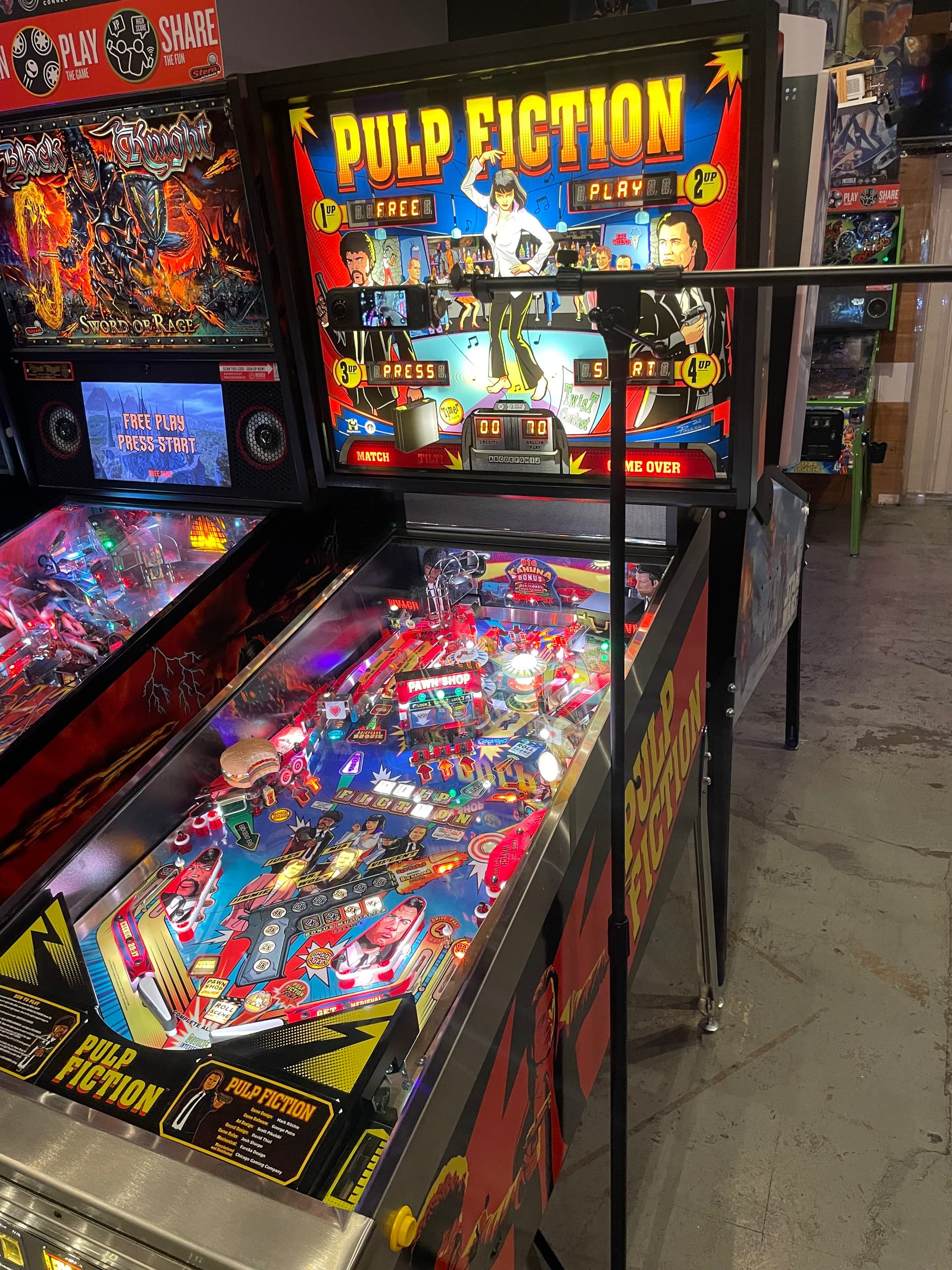
and here is the resulting video that can be created from that one-camera recording with a bit of editing:
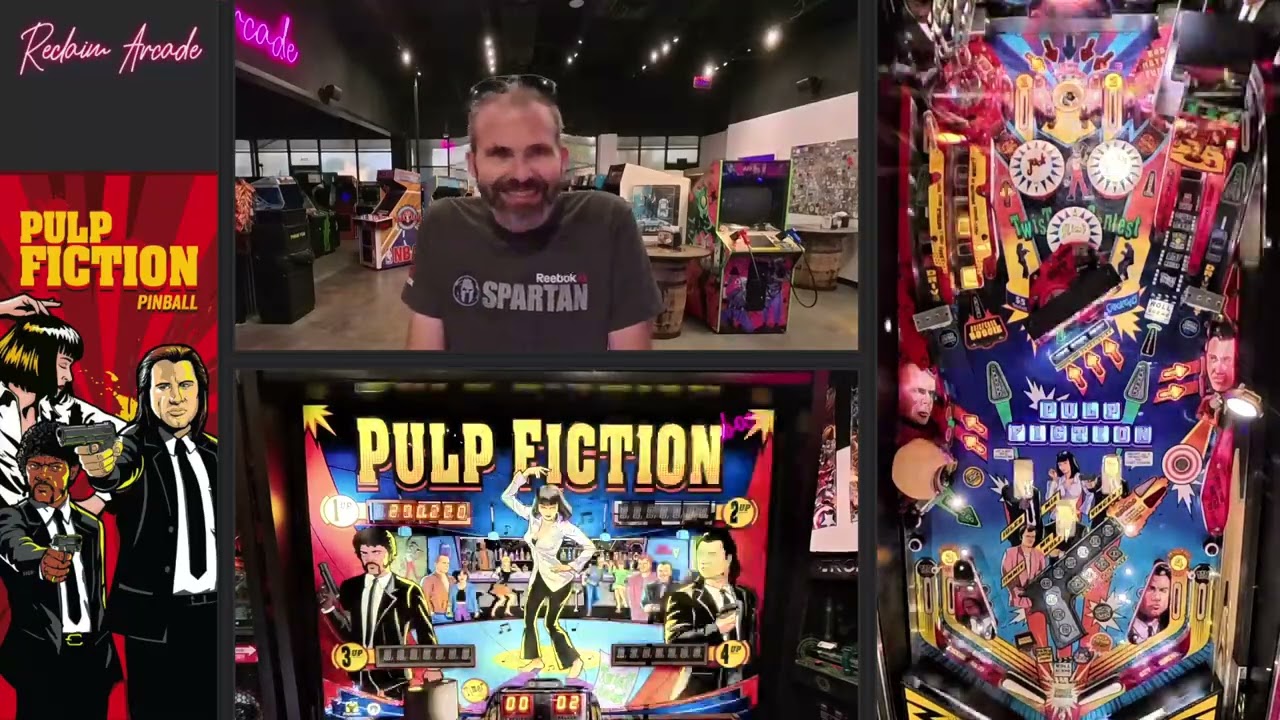
Now I just need to figure out a better stand that doesn’t stick out to the right so far since the weight of the camera is negligible, I could probably hacksaw the end of the boom arm off but there may be better pre-built structures to support this and work well fitting between games. But ultimately the whole thing is easy to transport and with an external mic setup and a few more small tweaks could give a real quality video when doing remote-based content. Figured I’d share as I hadn’t seen anyone playing with this idea.
3 Likes
This is absolutely incredible. I struggled to see a seam on the playfield with the cameras facing you and the backboard. When you rotate it, your face looks fine, the distortion of the windows behind you doesn’t matter.
I don’t think anything will top this as a mobile set up for a long time until this can stream to HDMI and be processed in realtime for Twitch.
I keep trying to figure out a better mobile rig to travel with, but the reality is anything else requires multiple cameras, batteries, and a computer for streaming. I think I’m gonna buy one of these just from your example video!
1 Like
It seems like it can send a live feed to OBS. Is the limitation getting OBS to flatten it out and crop it for the three views?
https://onlinemanual.insta360.com/x5/en-us/camera/appuse/obs
I noticed that as well, but yeah I think it’s not as simple as cropping because a 360 video made flat has all kinds of curves to it. The OBS method is really to be able to livestream 360º to YouTube. Now that itself could be pretty cool though. I uploaded a video of gameplay and later watched it on a VR headset and it was really trippy. Even in the YouTube mobile app when you’re watching it you can move your phone around to “look around”. Kind of a fun experiment.
I was inspired by your work with x5 and liked the results. I did a proof of concept using an insta360x4 I picked up.
It required some custom software to take the equirectangular video stream and convert it into 3 different virtual cameras for OBS to consume which did end up working and distortion wise it looks good.
The roadblock from this being a workable option remaining is any realtime capture from a consumer grade 360 camera is far more limited than the resolution it can write to its sd card.
For example when connected via USB-C the insta360x4/5 can only output 2880x1440p which sounds like it will be enough but shared across 3 virtualized views with a lot of cut out space its lower resolution than a viewer would want.
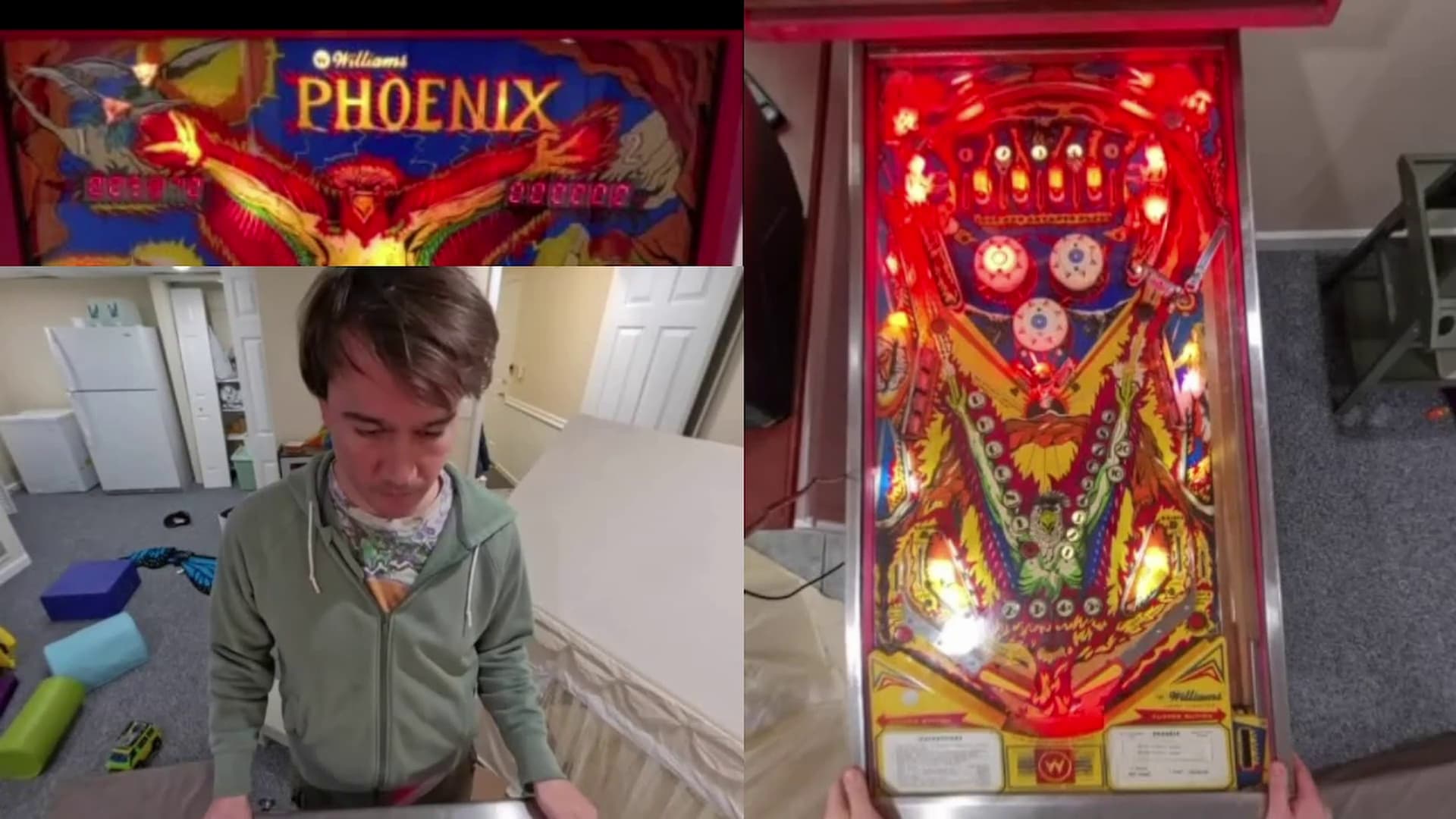
Here is a screenshot snapped from a test live stream. I didn’t crop in the content super cleanly and obviously my space is a mess, but as you can see the resolution when captured live is muddy and low quality beyond what I think could be used.
This was fun to work on and I hope consumer 360 cameras come along that offer higher resolution that you can get a hold of live. Happy to share my notes with anyone who is interested.
1 Like
Thanks for sharing your test! I hadn’t considered the resolution of the output as a potential issue but that’s a good point. Out of curiousity what was the software you used to modify the 360º output for OBS? Seems like an interesting tool for the toolbelt regardless and could come in handy in the future.
The software was something I wrote, I was planning on polishing it up and sharing it with the community if this was viable. I may still do that, but taking on user trouble shooting and platform compatibility for something that doesn’t reach the bar seems like a heachache at this time lol. The core technology I wrote on top of is ffmpeg (which I believe is what obs uses under the hood as well)
1 Like
To follow up once more on the 360 camera viability. I am seeing some promising specs for the Ricoh Theta line of products. https://us.ricoh-imaging.com/wp-content/uploads/2023/04/Theta_Catalog_2022.pdf the line item for Live Streaming (USB) looks good 3840x1920@100Mbps. Perhaps sometime I will try to get my hands on one to try, or someone else will share results with it.
Everyone is going to tell you that you need 60fps (you really don’t). The 100Mbps for 4K is not to shabby as some manufactures are trying to convince us that 12Mbps is visually lossless.
So I am looking to get into the mobile streaming/recording game. I have a Sony ZV1, 420, Yolo S3, Rodecaster Duo, a version of Karls rig and plenty of arms/lights. Everything runs through a pretty beefy gaming laptop (Legion). I mostly want to stream local tournaments and bring my rig to friends houses to film tutorials. What do I need take this wireless? I know most people use Accsoons and some have moved to things like the YoloBox. If yall were starting from “scratch” which direction would you go? Money is not an issue but I would prefer to not throw crazy money at this. I am not planning streaming major events or anything. Just our local monthlies/weeklies. I do want to use OBS as I am already familiar with it. Please point me in the right direction. Thanks in advance for the help!
If I started from scratch, I would go with two accusoons for player and score, then a cosmos c2 for playfield. That’s a pretty bulletproof setup for wireless. The stuff that @dri and others do it way over my head, but seems to work really well for them. I’ll let them chime in.
Well, if you have crazy money, TeraDek are built for broadcast. 
Making the Yolo S3 “wireless” you first need to convert it to HDMI: Amazon.com: OBSBOT UVC to HDMI Adapter 2.0, for Tiny 2, Tiny 4K/1080P, Meet 4K/1080P, UVC Webcams : Electronics
Yeah, don’t do what I do unless you know what you’re doing. I use a 4K60 HDMI multiviewer that sends a 4K canvas with up to four cameras that I convert to NDI and put on a network that is a meshed tri-band that give me up to 500-600Mbit/s for the image (as opposed to 4-6Mbit/s for the 1080p60 Accsoon’s).
The general benefit of using a multiviewer is that you only capture one video signal so everything is in perfect sync at all times and you don’t need quad capture cards (does your legion have a thunderbolt port?) or complicated stacks of USB capture cards that will give you nothing but trouble.
The absolute best quality at the lowest price point (this is a < $300 solution) is to use a 1080p60 multiviewer with the good 'ol Monoprice WiHD transmitters. Superb quality at the expense of line of sight that is absolutely crucial. I did a comparison of this in this video: https://youtu.be/1RC6P9AKORE
1 Like
Saying Money is not an issue but I don’t want to throw crazy money at it means that I can afford to get whatever I need but would prefer to find a solution that provides good quality (doesn’t have to the best possible) at a reasonable price. This is not saying I want the cheapest solution. I just want a relatively high quality solution… let’s call that 1080p 60fps that I can roll around a venue and broadcast from a laptop. I’m not trying to be a professional broadcaster. It’s just part of the pinball hobby that I would like to get into.
As for the S3… I only mention this USB cam bc I was under the impression that something like the Yolobox makes it possible to wirelessly transmit USB and HDMI signals. Maybe I misunderstood how that works.
I realize that I am trying to simplify a very complicated system. I appreciate all of the help and feedback. Hopefully I will be able to order some more equipment soon and yall will what kind of content I want to put out.
What is a cosmos I am not familiar with that.
Also yes the laptop has a thunderbolt port.